
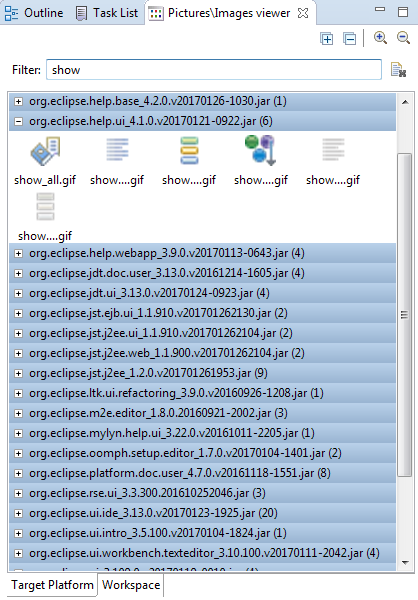
Image/ Picture viewer provides a View containing all the images from the Workspace or Target platform in form of a Gallery with bundle id's as parent categories.
Allows to quickly find icon you need for your plugin or application and copy it into your project, as well as into file manager.
Categories: General Purpose Tools, Graphics, Tools, UI
Additional Details
Eclipse Versions: 2019-03 (4.11), 2018-12 (4.10), 2018-09 (4.9), Photon (4.8), Oxygen (4.7), Neon (4.6), Mars (4.5), Luna (4.4), Kepler (4.3), Juno (4.2, 3.8), Previous to Juno (<=4.1), 2019-06 (4.12), 2019-09 (4.13), 2019-12 (4.14), 2020-03 (4.15), 2020-06 (4.16), 2020-09 (4.17), 2020-12 (4.18), 2021-03 (4.19)
Platform Support: Windows, Mac, Linux/GTK
Organization Name: OnPositive
Development Status: Production/Stable
Date Created: Friday, July 28, 2017 - 10:50
License: EPL
Date Updated: Friday, June 28, 2024 - 00:24
Submitted by: Dmitry Karpenko
| Date | Ranking | Installs | Clickthroughs |
|---|---|---|---|
| July 2024 | 391/656 | 13 | 7 |
| June 2024 | 368/681 | 21 | 17 |
| May 2024 | 415/682 | 16 | 12 |
| April 2024 | 369/687 | 23 | 10 |
| March 2024 | 378/694 | 26 | 4 |
| February 2024 | 392/687 | 20 | 7 |
| January 2024 | 361/691 | 26 | 11 |
| December 2023 | 464/671 | 10 | 12 |
| November 2023 | 430/686 | 15 | 9 |
| October 2023 | 320/673 | 42 | 12 |
| September 2023 | 404/663 | 18 | 17 |
| August 2023 | 358/673 | 25 | 9 |
Marketplace Drag to Install Button
By adding the following code below to your website you will be able to add an install button for Image/Picture Viewer.
HTML Code:
Markdown Syntax:
Output:
