
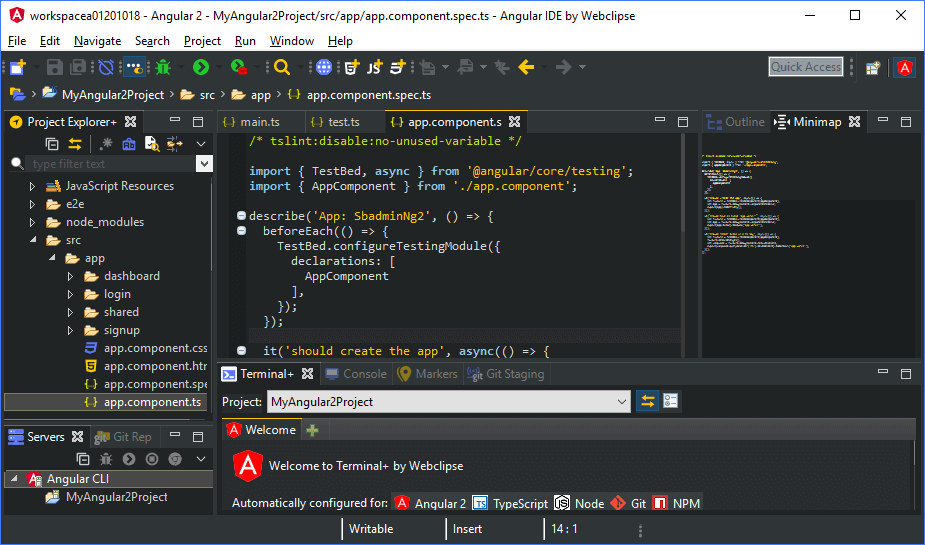
Darkest Dark theme from DevStyle - a free plugin providing an enhanced set of experiences for Eclipse. Included:
- Darkest Dark theme - #1 in the Marketplace:
True dark theme with flat replacement icons
A great experience over Windows, Mac and Linux
- Included with DevStyle:
New light and dark color themes
All new startup experience for Eclipse
Inline search for text editors
Entirely free to use! Get DevStyle today.
Tags: dark, theme, Darkest Dark, Genuitec
Additional Details
Eclipse Versions: 2024-06 (4.32), 2024-03 (4.31), 2023-12 (4.30), 2023-09 (4.29), 2023-06 (4.28), 2023-03 (4.27), 2022-12 (4.26), 2022-09 (4.25), 2022-06 (4.24), 2022-03 (4.23), 2021-12 (4.22), 2021-09 (4.21), 2021-06 (4.20), 2021-03 (4.19), 2020-12 (4.18), 2020-09 (4.17), 2020-06 (4.16), 2020-03 (4.15), 2019-12 (4.14), 2019-09 (4.13), 2019-06 (4.12), 2019-03 (4.11), 2018-12 (4.10), 2018-09 (4.9), Photon (4.8), Oxygen (4.7), 2024-06 (4.33), Neon (4.6)
Platform Support: Windows, Mac, Linux/GTK
Organization Name: CodeTogether Inc.
Development Status: Production/Stable
Date Created: Tuesday, January 31, 2017 - 12:51
License: Commercial - Free
Date Updated: Tuesday, June 18, 2024 - 08:14
Submitted by: Tim Webb
| Date | Ranking | Installs | Clickthroughs |
|---|---|---|---|
| July 2024 | 5/656 | 8313 | 40 |
| June 2024 | 6/681 | 10827 | 75 |
| May 2024 | 6/682 | 10796 | 49 |
| April 2024 | 5/687 | 12345 | 57 |
| March 2024 | 4/694 | 14353 | 82 |
| February 2024 | 5/687 | 11373 | 322 |
| January 2024 | 5/691 | 10676 | 75 |
| December 2023 | 6/671 | 9424 | 59 |
| November 2023 | 6/686 | 11696 | 50 |
| October 2023 | 5/673 | 12951 | 76 |
| September 2023 | 4/663 | 13968 | 59 |
| August 2023 | 5/673 | 12590 | 66 |
Unsuccessful Installs
Unsuccessful Installs in the last 7 Days: 204
Marketplace Drag to Install Button
By adding the following code below to your website you will be able to add an install button for Darkest Dark Theme with DevStyle.
HTML Code:
Markdown Syntax:
Output:

Reviews Add new review
Re: Re: Re: install fail, please help me
Submitted by Brian Fernandes on Thu, 03/23/2023 - 16:06
In reply to Re: Re: install fail, please help me by Eduardo Mendel
Eduardo / Wayne,
Thank you for your suggestions - we do, of course, have archived sites for each version of DevStyle, though there are some other considerations becuase of which they may still not work when you try to use them today. We're taking a look to see what our options are here and will keep you posted. Thanks!
Re: Re: install fail, please help me
Submitted by Wayne Baldwin on Tue, 03/21/2023 - 09:11
In reply to Re: install fail, please help me by Brian Fernandes
Like the originator of this issue (who's reply does not exist?), I have several versions of Eclipse installed on my work VM because features I require to do my job get dropped by Eclipse or installed plugins. You need to archive older versions.
Re: Re: install fail, please help me
Submitted by Johan Collazos on Thu, 05/04/2023 - 12:22
In reply to Re: install fail, please help me by Brian Fernandes
But what happens when due to your project you can only use a specific version of eclipse? for example 2020-06 where the backward compatibility is
folder/file/package name on hover in package explorer
Submitted by Mike Boi on Sat, 02/18/2023 - 01:35
In the default theme, if the names of the folders or files are cut off due to the size of the Package Explorer view, hovering over them used to show their names in a tooltip(not exactly a tooltip idk what its called it extends the name that is cut off). However, after applying this theme, this option appears to have turned off and I can't find where it is located. I would appreciate some help. Cheers!
By the way, I like the theme.
Re: folder/file/package name on hover in package explorer
Submitted by Brian Fernandes on Wed, 03/01/2023 - 06:36
In reply to folder/file/package name on hover in package explorer by Mike Boi
Mike, thanks for the report - this s a known issue in DevStyle, and unfortunately we don't have a workaround to suggest. This is a priority fix for the next release, so please watch out for the update. Glad you like the theme!
no indication for a pressed toggle button.
Submitted by asaf magen on Tue, 02/14/2023 - 16:54
Heelo,
im using eclipse 2022 09 and your latest vesion 2022.6.13a from the market store.
when i apply any theme the icon no longer indicate if a toggle button is pressed or not.
can you please check it?
thanks in advance and a great theme tool.
Re: no indication for a pressed toggle button.
Submitted by Brian Fernandes on Thu, 02/16/2023 - 08:15
In reply to no indication for a pressed toggle button. by asaf magen
Asaf, this is a known issue with the current version DevStyle - sorry about that. This is something we are targeting for the next release, thank you for your report and support of DevStyle!
Error on Installation
Submitted by Cagatay Goncu on Wed, 02/08/2023 - 04:13
I have an error when I try to download Darkest Dark Theme. Do you have an idead about that error?
OS: Windows 10
Eclipse version: 2021-03 (4.19.0)
Error :An error occurred while collecting items to be installed
session context was:(profile=epp.package.cpp, phase=org.eclipse.equinox.internal.p2.engine.phases.Collect, operand=, action=).
Problems downloading artifact: org.eclipse.update.feature,com.genuitec.eclipse.base.feature,1.11.0.202206271604.
Re: Error on Installation
Submitted by Brian Fernandes on Mon, 02/13/2023 - 14:19
In reply to Error on Installation by Cagatay Goncu
Cagatay, I'm afraid DevStyle will not work on older versions of Eclipse at this point due to some signing incompatibilities with the plugins. You will notice several signing errors in your your error log. Please udpate to a more recent version of Eclipse to install DevStyle. Thanks!
I cannot install this plugin.
Submitted by João Marques on Wed, 01/04/2023 - 07:08
Hello,
I am trying to install this plugin. However, I am having the following error:
The following solutions are not available: darkest dark theme with devstylec 2022.6.13.a.
If I try to proceed anyway, I obtain the information that the request could not be completed, and to see the error log for details. In the error log, I find a javax.net.ssl.SSLHandshakeException.
After further examination, I believe your certificates have expired. If that is the case, I ask you to fix this and let me know when I can install this theme again. Otherwise, please let me know what to do to be able to install this theme.
Thanks in advance,
João
Re: I cannot install this plugin.
Submitted by Brian Fernandes on Thu, 01/05/2023 - 13:09
In reply to I cannot install this plugin. by João Marques
João, we did have a cert issue that was resolved yesterday. Do try again and it should install just fine - thanks!
Theme Deep Black no border
Submitted by kappe (not verified) on Wed, 10/19/2022 - 03:42
The deep black theme is really beautiful.
However, I have a problem when viewing multiple panels together. When I have the code, the package explorer on the left, the outline on the right and the console below, I can't distinguish the different sections because there is no border to distinguish them. Could you kindly add borders of a different color to better delineate the sections?
Thanks
Getting an error
Submitted by Andrew Drourr on Tue, 10/04/2022 - 07:13
Unable to read repository at <link redacted as per terms of service>.
PKIX path building failed: sun.security.provider.certpath.SunCertPathBuilderException: unable to find valid certification path to requested target
Unsure why but im getting the error above. Could be im doing something wrong but didnt think I was.
Re: Getting an error
Submitted by Brian Fernandes on Fri, 10/07/2022 - 12:14
In reply to Getting an error by Andrew Drourr
Andrew, sorry to hear you're running into this. There are several reasons for a PKIX error, but it's mostly rooted around not being able to establish an HTTPS connection with our servers. This could happen due to a corporiate firewall/proxy not letting the traffic correctly through, or using an older version of Java which doesn't have corresponding certs. My recommenation would be to update the version of Java you use to run Eclipse and/or you can download a copy of our site and install it from a local directory as described here: https://www.genuitec.com/forums/topic/offline-installation/
It can bug you workspace.
Submitted by Rudah Reis on Wed, 08/24/2022 - 22:39
My IDE was never the same again after installed this. It bugs the editors sooner or later. Even after i uninstalled and created another workspace i cant' open 'application.properties' files, if i try it, all other editors get unable to open files. It occured only after i installed this theme...
Re: It can bug you workspace.
Submitted by Brian Fernandes on Thu, 08/25/2022 - 15:45
In reply to It can bug you workspace. by Rudah Reis
Rudah, sorry to hear about your experience, though it's quite unlikely that DevStyle could cause issues like you describe. Could you please let us know what OS you're on and exact version and distribution of Eclipse you're using? Could you elaborate on what goes wrong with the editors, can you share the error message you see? We're happy to discuss this further here or we can follow up via email if you write to support@genuitec.com Thanks!
Amazing Dark Theme
Submitted by Manoj Baishya on Wed, 08/17/2022 - 13:39
Thank you for this awesome theme. I do not feel the need for IntelliJ IDEA at all.
My question: can we change the background colour of any selected list-item in the Outline View, Package Explorer View, Content Assist, Preferences, etc? Attaching a screenshot URL and system information for reference. Current highlight/selection bg color is #6688ff.
Re: Amazing Dark Theme
Submitted by Brian Fernandes on Mon, 08/22/2022 - 07:24
In reply to Amazing Dark Theme by Manoj Baishya
Manoj, glad you are enjoying DevStyle, and thank you for sharing the screenshot to explain your request. This is not something you can currently change with DevStyle and I believe it's something that will be based on the OS level theme. Since you are using Gnome, perhaps you could change it there, or are you looking for a different color just in Eclipse?
Re: Re: Amazing Dark Theme
Submitted by Manoj Baishya on Tue, 08/23/2022 - 05:16
In reply to Re: Amazing Dark Theme by Brian Fernandes
Okay, understood! I changed the Gnome theme, but that does not alter the colour. It would be good to have the menu item highlighted in a different colour so that the text looks a little more readable, but it is just a minor issue which can be overlooked. Thanks.
auto update deletes my server setting
Submitted by Chang Moon on Wed, 06/22/2022 - 03:34
I loved the color decoration of devstyle mode, but it deleted all server setting of my projects. I managed to get it back by deleting devstyle(uninstall)
Re: auto update deletes my server setting
Submitted by Brian Fernandes on Mon, 07/04/2022 - 09:35
In reply to auto update deletes my server setting by Chang Moon
Chang, an odd issue indeed - we've never come across an issue like this. DevStyle does not modify any workspace or project settings as it has no need to make such changes for theme support. Do you mind clarifying what you mean by, "server settings of projects"? What servers are these, and how do you see the settings? Perhaps there's a themeing issue that caused the settings to be incorrectly displayed? If you can share additional details, we'll be happy to take a look. Thanks!
ubuntu 22.04 javadoc
Submitted by Sharofiddin Pardayev on Wed, 04/27/2022 - 02:48
It is an amazing plugin, which makes eclipse look better. But after updating ubuntu to 22.04 javadocs disappeared. Note, they are appearing without devstyle but after installing devstyle javadocs are invisible.
Re: ubuntu 22.04 javadoc
Submitted by Todd Williams on Wed, 04/27/2022 - 10:23
In reply to ubuntu 22.04 javadoc by Sharofiddin Pardayev
Sharoffidin,
Our technical team will look into this for the upcoming DevStyle update.
For everyone: The best place to post questions or problems is in the DevSyle forums on the Genuitec site: https://www.genuitec.com/forums/topics/devstyle/
Posting there allows us to follow up with you and ensure any issue gets addressed quickly.
Thanks!
I'm getting this error while installing darkest dark theme
Submitted by Jalal Ibrahimk… on Mon, 04/25/2022 - 01:42
Cannot complete the install because one or more required items could not be found.
Software being installed: DevStyle with CodeTogether Bundle 1.11.0.202105260439 (com.genuitec.eclipse.theming.feature.feature.group 1.11.0.202105260439)
Missing requirement: REST Core 1.11.0.202105260439 (com.genuitec.eclipse.patches 1.11.0.202105260439) requires 'package org.apache.commons.io 2.2.0' but it could not be found
Cannot satisfy dependency:
From: EditorMinimap 1.11.0.202105260439 (com.genuitec.eclipse.inlinesearch 1.11.0.202105260439)
To: bundle com.genuitec.eclipse.monitor 0.0.0
Cannot satisfy dependency:
From: Webclipse UDM 13.0.0.202105260439 (com.genuitec.eclipse.monitor 13.0.0.202105260439)
To: bundle com.genuitec.eclipse.patches 0.0.0
Cannot satisfy dependency:
From: DevStyle (includes Darkest Dark Theme) 1.11.0.202105260439 (com.genuitec.eclipse.theming.core.feature.feature.group 1.11.0.202105260439)
To: com.genuitec.eclipse.inlinesearch [1.11.0.202105260439]
Cannot satisfy dependency:
From: DevStyle with CodeTogether Bundle 1.11.0.202105260439 (com.genuitec.eclipse.theming.feature.feature.group 1.11.0.202105260439)
To: com.genuitec.eclipse.theming.core.feature.feature.group [1.11.0.202105260439]
Re: I'm getting this error while installing darkest dark theme
Submitted by Todd Williams on Mon, 04/25/2022 - 09:34
In reply to I'm getting this error while installing darkest dark theme by Jalal Ibrahimk…
It appears that you may have an issue reliably contacting the Genuitec update site.
You can alternatively install by creating a mirror update site as described for used for air-gapped installations, here: https://www.genuitec.com/forums/topic/offline-installation/
Darkest Dark Theme installation problem
Submitted by Jalal Ibrahimk… on Mon, 04/25/2022 - 01:33
is there alternative way for installing? because I'm getting error
Install archive
Submitted by Clodoaldo Pinto Neto on Thu, 01/20/2022 - 11:48
The download and repository urls are blocked in my organization. Is there an install archive?
Re: Install archive
Submitted by Brian Fernandes on Mon, 01/24/2022 - 11:46
In reply to Install archive by Clodoaldo Pinto Neto
We do not have an archived update site, but you can use the instructions in this post to create your own archived site when on a different network. https://www.genuitec.com/forums/topic/offline-installation/ Hope this helps!
ZLIB Download Error
Submitted by Bradly Ali on Fri, 01/07/2022 - 09:52
Unable to install with a download error.
I'm using
Eclipse IDE for Enterprise Java and Web Developers (includes Incubating components)
Version: 2021-12 (4.22.0)
Build id: 20211202-1639
Re: ZLIB Download Error
Submitted by Todd Williams on Thu, 01/13/2022 - 11:36
In reply to ZLIB Download Error by Bradly Ali
Hi Bradley,
We've tested the install process and it seems to be fine, at least at this point. However, there could've been an intermittent issue at the time you tried to install. If you are still having an issue, please send us an email at support@genuitec.com and we'll be happy to help resolve the problem.
Regards,
Todd
Cannot complete the install because one or more required items..
Submitted by Eric Moritz on Thu, 01/06/2022 - 07:42
I had to update/install to STS 4.13.0 (based on Eclipse 2021-12 release, 4.22) because of OS updates and getting the error reported: https://marketplace.eclipse.org/content/error/report/5489717. Is the a fix/workadound for this issue, I miss having DevStyle on my IDE.
Thanks in advance.
Re: Cannot complete the install because one or more ..
Submitted by Brian Fernandes on Thu, 01/06/2022 - 14:48
In reply to Cannot complete the install because one or more required items.. by Eric Moritz
Eric, STS does seem to ship with a different version of commons.lang3 (3.4) when compared with Eclipse 2021-12, which ships version 3.1.0 - regardless, when we attempted to install DevStyle from the marketplace via simple drang and drop, it installed just fine (plugin in the installation was updated). How did you install STS? You could explicitly add the Eclipse orbit repository (https://download.eclipse.org/tools/orbit/downloads/drops/I2021110120550…) to your available update sites in case it's missing to ensure the commons.lang3 plugin can be found during the install. Do create a post on our forums if you are still having issues where we can dig ino this further.
Re: Re: Cannot complete the install because one or more ..
Submitted by Eric Moritz on Fri, 01/07/2022 - 15:41
In reply to Re: Cannot complete the install because one or more .. by Brian Fernandes
Brian,
Great and thanks for your support, adding the Eclipse orbit repository did the trick.
Cannot complete the install because one or more required items c
Submitted by Eric Moritz on Wed, 01/05/2022 - 19:33
Can't install based on https://marketplace.eclipse.org/content/error/report/5489717, is there a fix/workaround?
Run As options as missing after installation
Submitted by shashank Sase on Thu, 12/30/2021 - 06:06
After installing "Darkest Dark Theme with DevStyle" in Run As options are missing, Don't know how Is this happening try to restart and reinstall but the result is the same.
Re: Run As options as missing after installation
Submitted by Brian Fernandes on Wed, 01/05/2022 - 06:49
In reply to Run As options as missing after installation by shashank Sase
Shashank, we have been unable to replicate this. Can you please let us know what version and distribution of Eclipse you're using, and what file type you're looking for Run As on?
Can not install Darkest Dark (Eclipse 2021-12)
Submitted by Blocky .jar on Fri, 12/10/2021 - 10:28
I can't install darkest dark on eclipse 2021-12. My problem is that the eclipse marketplace does not find the darkest dark in the first place
Re: Can not install Darkest Dark (Eclipse 2021-12)
Submitted by ROM Void on Thu, 12/16/2021 - 03:07
In reply to Can not install Darkest Dark (Eclipse 2021-12) by Blocky .jar
Simply open a Marketplace window in Eclipse, then just click and hold the Install button on this page and drag it to the Marketplace window you opened.
Re: Can not install Darkest Dark (Eclipse 2021-12)
Submitted by Brian Fernandes on Wed, 01/05/2022 - 06:39
In reply to Can not install Darkest Dark (Eclipse 2021-12) by Blocky .jar
Thank you for bringing this to our attention. This issue has been resolved, and you will now find it in the in-product Marketplace again.
Good, but scroll bar is to thin
Submitted by Walter Valle on Fri, 11/19/2021 - 10:46
I like the Darkest Dark theme. I use this in my daily work. But there is one thing that is very annoing. The scrollbar is very thin and disappears on mouse out. I suggest you add a parameter that allows the user to change the scrollbar width directly in the preferences screen.
Dark Theme black selected text in Windows server 2019
Submitted by Brad Huang on Thu, 10/21/2021 - 05:11
I know the issue is fixed in updated window 10.
But in windows server 2019 still have the same problem.
I have update windows server to the newest version.
Problem: The folder expand icon and selected text in black.
DevStyle Version: 1.11.0.202105260439
XML Editor Design View is jarring
Submitted by Akshat - on Fri, 10/15/2021 - 09:48
Love the theme. It looks great! Just had one issue.
The design view for xml editor shows up as a table with solid white borders on dark background which looks extremely jarring. Vertical separators are almost unnecessary and horizontal separators could have lower opacity or be removed altogether.
Looks pretty but makes IDE sluggish
Submitted by Zach Foster on Sun, 09/26/2021 - 16:41
The slowdown was getting unbearable. I had to uninstall plugins one by one until I got to this one and Eclipse returned to being snappy. Coworker confirmed that this was slowing dow his Eclipse as well.
Re: Looks pretty but makes IDE sluggish
Submitted by Brian Fernandes on Thu, 09/30/2021 - 11:26
In reply to Looks pretty but makes IDE sluggish by Zach Foster
Zach, this isn't an issue we're aware of. Can you please let us know your base version of Eclipse and the distribution, like Java & Web or C/++, PHP, etc.? Also, the version of Java being used to Eclipse and OS? If you can share your coworkers details too, that would be additionally helpful. We'd love to replicate this and get it addressed ASAP.
Re: Re: Looks pretty but makes IDE sluggish
Submitted by Miroslav Dobis on Tue, 01/18/2022 - 06:31
In reply to Re: Looks pretty but makes IDE sluggish by Brian Fernandes
Hi Brian,
today I installed Darkest Dark Theme into Spring Tool Suite 4 (Version: 4.13.0.RELEASE) with little help of lang3 from local store. Sluggish is maybe weak word, but I've played with it a little and found out that IDE behaves sluggishly only when Console with Ansi mode enabled is visible. Maybe that could help you investigate more.
Anyway, I use Darkest Dark Theme in other Eclipse IDEs for years and I'm pretty satisfied. You are doing great job guys.
Re: Re: Re: Looks pretty but makes IDE sluggish
Submitted by Brian Fernandes on Tue, 01/18/2022 - 14:18
In reply to Re: Re: Looks pretty but makes IDE sluggish by Miroslav Dobis
Miroslav, we really appreciate you running that down for us - we can try to replicate with this setting and I'm adding this to our bug notes. Just to be clear, when you say ANSI mode, do you mean the the "Interpret ASCII control characters" Console preference? Thank you for the vote of confidence and being a long time Darkest Dark supporter!
Re: Re: Re: Re: Looks pretty but makes IDE sluggish
Submitted by Miroslav Dobis on Wed, 01/19/2022 - 02:23
In reply to Re: Re: Re: Looks pretty but makes IDE sluggish by Brian Fernandes
Hi Brian, console ansi mode: Window / Preferences / Ansi Console with Enabled checkbox checked or toolbar of Console view toggle button "Enable / Disable Ansi Console". I'm running this on Windows 10 machime. Thank you.
devstyle deep theme theme currently selected line background
Submitted by xh z on Thu, 08/19/2021 - 05:16
devstyle deep theme theme currently selected line background color and scroll bar improvement suggestions...
The gray background color currently selected under the devstyle deep theme theme style does not match the overall color style of the devstyle deep theme theme. I hope that the currently selected background color can be re-adjusted, please see. . .
The positioning of the scroll bar is not obvious, which affects the width of the mouse drag. I hope that the display style of the scroll bar can be improved. I hope that an optional item can be added to make the scroll bar wider and brighter.
Love the new dark themes. Very readable.
Submitted by Mark Bratcher on Sun, 07/25/2021 - 10:57
After getting these new dark theme choices working, I've totally abandoned the default themes. My eyesight isn't what it used to be and the tiny Eclipse icons drove me crazy, and the standard white background theme was actually Ok. It just took some getting used to after coming off the dark theme of VS Code. And the standard dark theme in Eclipse is simply just ugly and not as readable.
The Darkest Dark themes make the small icons more distinct and I personally find the source code has a high degree of readability in this mode. I tried all of the dark theme choices and found a couple that I like the most in terms of how various elements are rendered.
Re: Love the new dark themes. Very readable.
Submitted by Brian Fernandes on Fri, 07/30/2021 - 14:43
In reply to Love the new dark themes. Very readable. by Mark Bratcher
Thank you for the kind words Mark, we're so happy to hear you're really enjoying the theme and perhaps more importantly, that it's making Eclipse more accessible for you. I will admit that the new icons (especially in pastel colors) are my personal favourite theme feature. If you tweak an inbuilt theme and find settings you like, you can copy the theme code and share it with others too. Thanks again!