
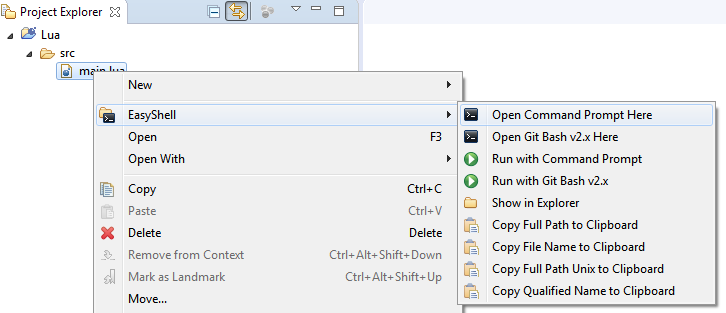
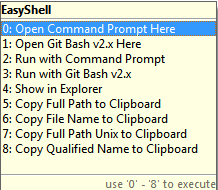
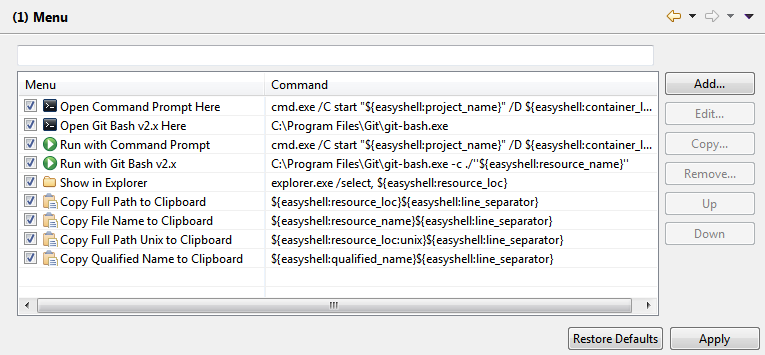
This Eclipse plugin allows to open a shell window or file manager from the popup menu in the navigation tree or editor view. Additionally it is possible to run selected file in the shell, copy file or directory path or run user defined external tools. Key shortcuts and multiple selections are also supported!
EasyShell 2.3
Enhancements, bugfixes and clean-ups for v2.x stream.
release: https://github.com/anb0s/EasyShell/releases/tag/v2.3.0
resolved: https://github.com/anb0s/EasyShell/milestone/8?closed=1
EasyShell 2.2
Enhancements, bugfixes and clean-ups for v2.x stream.
release: https://github.com/anb0s/EasyShell/releases/tag/v2.2.1
resolved:
https://github.com/anb0s/EasyShell/milestone/9?closed=1
https://github.com/anb0s/EasyShell/milestone/5?closed=1
EasyShell 2.1
Cleanups, enhancements and bugfixes for new v2.x stream.
release: https://github.com/anb0s/EasyShell/releases/tag/v2.1.0
resolved: https://github.com/anb0s/EasyShell/milestone/4?closed=1
EasyShell 2.0:
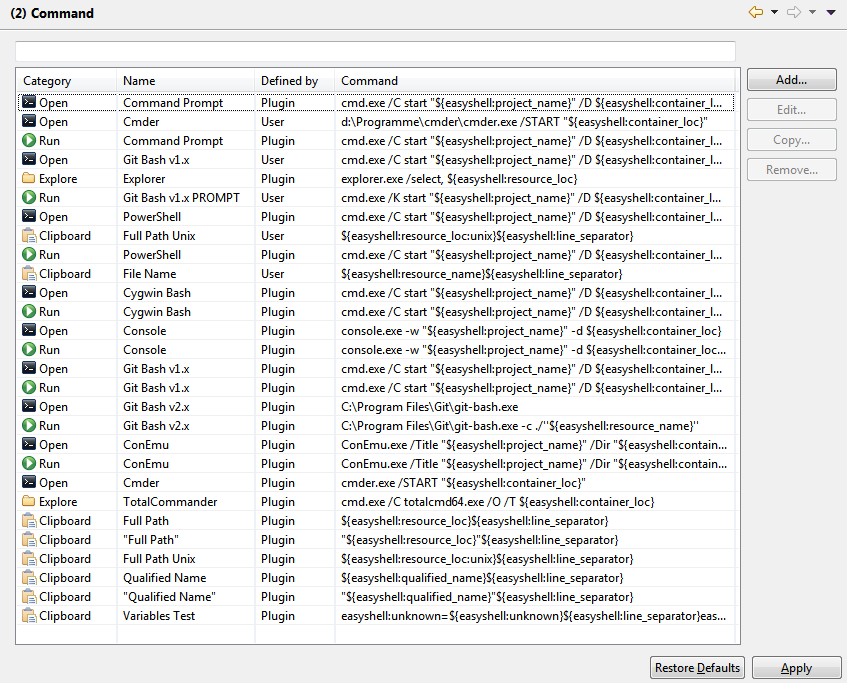
First release after migration to GitHub with EPL license and support for Eclipse 4.6 Neon. It's a complete rewrite of code with extended tool, dynamic presets and dynamic menus support!
release: https://github.com/anb0s/EasyShell/releases/tag/V2_0_0
resolved: https://github.com/anb0s/EasyShell/milestone/2?closed=1
Categories: Tools
Tags: copy path, powershell, Shell, explorer, open, external, run, cygwin, bash, terminal, dolphin, konqueror, total commander, console2, git, ConEmu, cmd.exe, Nautilus, Finder, xterm, nemo, thunar, pantheon, Cmder, KDE Konsole, XDG Open, Xfce Terminal, Sakura Terminal, ROXTerm, PCManFM, Qualified Name, guake, krusader
Additional Details
Eclipse Versions: 2023-06 (4.28), 2023-03 (4.27), 2022-12 (4.26), 2022-09 (4.25), 2022-06 (4.24), 2022-03 (4.23), 2021-12 (4.22), 2021-09 (4.21), 2021-06 (4.20), 2021-03 (4.19), 2020-12 (4.18), 2020-09 (4.17), 2020-06 (4.16), 2020-03 (4.15), 2023-09 (4.29), 2023-12 (4.30), 2024-03 (4.31), 2019-12 (4.14), 2019-09 (4.13), 2019-06 (4.12), 2019-03 (4.11), 2018-12 (4.10), 2018-09 (4.9), Photon (4.8), Oxygen (4.7), Neon (4.6), Mars (4.5), Luna (4.4), Kepler (4.3), Juno (4.2, 3.8), Previous to Juno (<=4.1)
Platform Support: Windows, Mac, Linux/GTK
Organization Name: anb0s
Development Status: Production/Stable
Date Created: Monday, July 27, 2009 - 10:52
License: EPL
Date Updated: Friday, October 6, 2023 - 10:51
Submitted by: Andre Bossert
| Date | Ranking | Installs | Clickthroughs |
|---|---|---|---|
| April 2024 | 151/684 | 187 | 13 |
| March 2024 | 130/694 | 286 | 9 |
| February 2024 | 160/687 | 173 | 11 |
| January 2024 | 159/691 | 195 | 13 |
| December 2023 | 146/671 | 211 | 8 |
| November 2023 | 159/686 | 213 | 11 |
| October 2023 | 113/673 | 378 | 14 |
| September 2023 | 104/663 | 384 | 12 |
| August 2023 | 103/673 | 357 | 13 |
| July 2023 | 97/668 | 418 | 16 |
| June 2023 | 103/669 | 429 | 7 |
| May 2023 | 121/671 | 335 | 17 |
Unsuccessful Installs
Unsuccessful Installs in the last 7 Days: 1
| Count | Error Message |
|---|---|
| 1 | Cannot continue the operation. There is another install operation in progress. |
Marketplace Drag to Install Button
By adding the following code below to your website you will be able to add an install button for EasyShell.
HTML Code:
Markdown Syntax:
Output:

Reviews Add new review
Administrator Terminal
Submitted by Reach Allen on Sun, 02/21/2021 - 22:20
Hi guys,
I am new to EasyShell, and I could not find a way to add my google cloud sdk shell (run as administrator) to this plugin. Please help if you know a way.
Thanks in advance.
Re: Administrator Terminal
Submitted by Andre Bossert on Mon, 02/22/2021 - 09:04
In reply to Administrator Terminal by Reach Allen
Hi,
please open an issue here: https://github.com/anb0s/EasyShell/issues
and we can talk in the issue...
Regards
Andre
Re: Re: Administrator Terminal
Submitted by Reach Allen on Mon, 02/22/2021 - 10:25
In reply to Re: Administrator Terminal by Andre Bossert
Hi Andre,
Thank you for your quick response.
I have just opened an issue over the Github repo.
Talk to you there.
Kind regards,
Reach
Abandoned
Submitted by Vincent Lecomte on Tue, 08/18/2020 - 09:37
Hello, has it been abandoned?
Re: Abandoned
Submitted by Andre Bossert on Wed, 08/19/2020 - 08:16
In reply to Abandoned by Vincent Lecomte
Hello, no it is still maintained, but less free time --> see GitHub page and report issues if needed ;)
does not open terminal within eclipse
Submitted by sriram bhami on Sat, 02/29/2020 - 16:12
How can I make it open a terminal session within eclipse? Currently it opens an independent terminal session outside eclipse? Thank you
Re: does not open terminal within eclipse
Submitted by Andre Bossert on Tue, 03/10/2020 - 06:40
In reply to does not open terminal within eclipse by sriram bhami
EasyShell only supports external commands. Please create new issue @GitHub, see issue link as not allowed to post links here.
Thanks!
Does not seem to work in Eclipse Oxygen
Submitted by Raju V on Sat, 09/30/2017 - 20:39
No errors.
'Easy Shell' does not appear in context menu.
Re: Does not seem to work in Eclipse Oxygen
Submitted by Andre Bossert on Mon, 10/02/2017 - 09:27
In reply to Does not seem to work in Eclipse Oxygen by Raju V
I'm working with Eclipse Neon and Oxygen in my daily development and EasyShell does work. I need more informtaion about your environment and how do you install EasyShell etc. Please file an issue at https://github.com/anb0s/EasyShell/issues
Thanks!
Corrupts tips in Eclipse Neon editor
Submitted by Konstantin Tokar on Sun, 02/19/2017 - 04:57
Corrupts tips in Eclipse Neon editor after calling the function "Copy full name to clipboard" and similar menu functions
Re: Corrupts tips in Eclipse Neon editor
Submitted by Andre Bossert on Tue, 02/21/2017 - 10:48
In reply to Corrupts tips in Eclipse Neon editor by Konstantin Tokar
Please file an issue at https://github.com/anb0s/EasyShell/issues
Give some information about your OS (Windows, Linux etc.) and Java Version. Thanks!
Re: Corrupts tips in Eclipse Neon editor
Submitted by Andre Bossert on Tue, 05/09/2017 - 15:28
In reply to Corrupts tips in Eclipse Neon editor by Konstantin Tokar
Should be fixed now with V2.1
EasyShell 2.0
Submitted by Andre Bossert on Fri, 09/30/2016 - 04:31
Please try new version 2.0 that should cover all enhancement requests and features written here :)
Feature request
Submitted by Lars Svensson on Fri, 10/10/2014 - 05:56
Hi! I use Easy Shell a lot. Very good and useful tool. One improvemnet I would like is if I right-click a java klass, I would like to have an option to get the path like "com.mysite.subclass.MyClassName" in the clipboard..
Feature Request added - please use sourceforge request in future
Submitted by Andre Bossert on Sat, 10/25/2014 - 12:46
In reply to Feature request by Lars Svensson
Thank You, I've created feature request:
https://sourceforge.net/p/pluginbox/feature-requests/17/
But, there is already a plugin for this:
http://marketplace.eclipse.org/content/copy-fully-qualified-class-name
http://www.jave.de/eclipse/copyfully/
Now available with EasyShell 2.0 :)
Submitted by Andre Bossert on Thu, 10/06/2016 - 10:39
In reply to Feature Request added - please use sourceforge request in future by Andre Bossert
Full Qualified Name
Options don't show up in Java EE perspective
Submitted by Gonçalo Cardoso on Tue, 09/09/2014 - 05:39
Options don't show up in Java EE perspective. Tested using Eclipse Luna 4.4.0
Please do not post issues here!
Submitted by Andre Bossert on Sat, 09/20/2014 - 16:05
In reply to Options don't show up in Java EE perspective by Gonçalo Cardoso
I've added your issue here:
https://sourceforge.net/p/pluginbox/bugs/22/
Please do not post issues here, because there is no possibility to get notification from Marketplace site!
Pretty much part of my standard install.
Submitted by Ivan Lazarte on Tue, 06/10/2014 - 10:47
Would love a ConEmu option as well, this is what I currently use for open:
ConEmu.exe /Title "Easy Shell" /Dir "{1}" /Single /cmd cmd
Request added
Submitted by Andre Bossert on Sun, 07/13/2014 - 05:53
In reply to Pretty much part of my standard install. by Ivan Lazarte
Thank You! Please add your requests to sourceforge page in future. I've added this for you now: https://sourceforge.net/p/pluginbox/feature-requests/16/
ConEmu support added with v1
Submitted by Andre Bossert on Tue, 09/30/2014 - 16:48
In reply to Pretty much part of my standard install. by Ivan Lazarte
ConEmu support added with v1.4.2
Very nice
Submitted by Alex L on Tue, 07/09/2013 - 04:42
A very nice and useful plugin. I have 2 suggestions though:
1. the ability to select which of the 4 options to be visible (for example, show only "Open" and "Explore", and hide the others, for people who use only some of these actions)
2. the ability to put the items in the main menu not in the "Easy Shell" sub-menu, for even quicker access.
Thanks!
Feature Request created
Submitted by Andre Bossert on Mon, 08/19/2013 - 03:53
In reply to Very nice by Alex L
Thanks for your request. I've created two feature requests at sourceforge:
1. https://sourceforge.net/p/pluginbox/feature-requests/14/
2. https://sourceforge.net/p/pluginbox/feature-requests/15/
Fix for spaces in folder and file names for Linux and Mac OS X
Submitted by Andre Bossert on Mon, 04/01/2013 - 07:59
Please use v1.4.1
A great utility
Submitted by Wim Jongman on Thu, 10/18/2012 - 09:43
One of my default tools. Thanks Andre.
Works with Eclipse 4.2 (Juno)
Submitted by Lance E Sloan on Sun, 09/30/2012 - 11:47
I've just installed EasyShell in Eclipse 4.2 (Juno) and it works well. The specifications say that this extension works with Eclipse versions 3.2-3.7, but it actually is compatible with later versions, too.
Keep in mind that when using with Mac OS X, some of the shell commands need to be changed from the defaults. For example:
In most times, it works well
Submitted by Emac Shen on Tue, 11/27/2012 - 20:06
In reply to Works with Eclipse 4.2 (Juno) by Lance E Sloan
In most times, it works well in Juno, but sometimes, the sub menu of Easy Shell in the context menu is missing, while in Helios, it never happens. It seems to be a compatibility issue between current version of EasyShell and Juno.
error log
Submitted by Andre Bossert on Fri, 01/11/2013 - 15:22
In reply to In most times, it works well by Emac Shen
Thanks for reporting. Please provide Moore information. May be some error log. Try New Version 1.4.0
Linux - Wrong folder when opening a terminal
Submitted by Diego lcántara on Thu, 07/19/2012 - 08:37
I've created a bug report:
https://sourceforge.net/tracker/?func=detail&aid=3545857&group_id=99802…
If the project's root folder contains spaces EasyShell fail to open a shell in the right folder.
For instance, if the Project's root folder is, say, "My Project - Core" and I right click for instance "My Project - Core/java/net", select EasyShell->Open, in Linux opens a terminal in ~/Documents
Thanks for this usefull plugin.
Diego.
spaces in names
Submitted by Andre Bossert on Fri, 11/09/2012 - 16:10
In reply to Linux - Wrong folder when opening a terminal by Diego lcántara
Please answer about the proposed fix i you bug request, so i can release it with next version. Thanks!
v1.4.0
Submitted by Andre Bossert on Fri, 01/11/2013 - 15:25
In reply to spaces in names by Andre Bossert
Should be fixed with v1.4.0. http://sourceforge.net/p/pluginbox/bugs/13/
Fix for spaces in folder and file names
Submitted by Andre Bossert on Mon, 04/01/2013 - 07:58
In reply to Linux - Wrong folder when opening a terminal by Diego lcántara
Please use v1.4.1
Nice plugin but a boring point
Submitted by Cimballi Mising name on Thu, 11/24/2011 - 11:04
The plugin is nice but the position of the menu item in the context menu could be better, mainly for the outline, I am used to have the "Run as" menu as the first item and now it's "Easy Shell".
v1.4.0
Submitted by Andre Bossert on Fri, 01/11/2013 - 15:26
In reply to Nice plugin but a boring point by Cimballi Mising name
Should be fixed with v1.4.0. See issue:http://sourceforge.net/p/pluginbox/bugs/15/
Mac OS X
Submitted by andre.bossert@… on Thu, 10/06/2011 - 17:01
Thanks for the report.
I've created bug request:
https://sourceforge.net/tracker/index.php?func=detail&aid=3419791&group…
I cannot test it with Mac OS X and need help from users. Please provide info how to open shell or run inside shell.
Good, but Mac OS X defaults are wrong
Submitted by Lance E Sloan on Wed, 10/05/2011 - 13:59
I like this extension a lot, but the defaults for Mac OS X are wrong. I've not worked out the proper commands for the two shell commands, but the others should be:
Help
Submitted by andre.bossert@… on Sun, 10/09/2011 - 12:50
In reply to Good, but Mac OS X defaults are wrong by Lance E Sloan
Thanks for the report.
I've created bug request:
https://sourceforge.net/tracker/index.php?func=detail&aid=3419791&group_...
I cannot test it with Mac OS X and need help from users. Please provide info how to open shell or run inside shell.
osx terminal command
Submitted by Patrick Polloni on Fri, 01/06/2012 - 11:16
In reply to Help by andre.bossert@…
I'm trying to find out the right command to open a terminal with osx.
The link for the bug request is not working. Sourceforge report an error trying to open the page.
The correct command to open a terminal form a terminal in Osx and make it change the directory is:
osascript -e 'tell application "Terminal" to do script with command "cd {path}"' where {path} should be substituted with the right path from one of those provided with EasyShell ({1}, {2},...).
At the moment this is not working. I hope someone else could give tips to make it working.
https://sourceforge.net/p/pluginbox/bugs/9/
Submitted by Andre Bossert on Fri, 11/09/2012 - 16:15
In reply to osx terminal command by Patrick Polloni
Thanks. Please use thi link.
So useful
Submitted by Fabrice BELLINGARD on Tue, 05/25/2010 - 05:15
Really wondering why this functionnality is not part of the official Eclipse platform!