
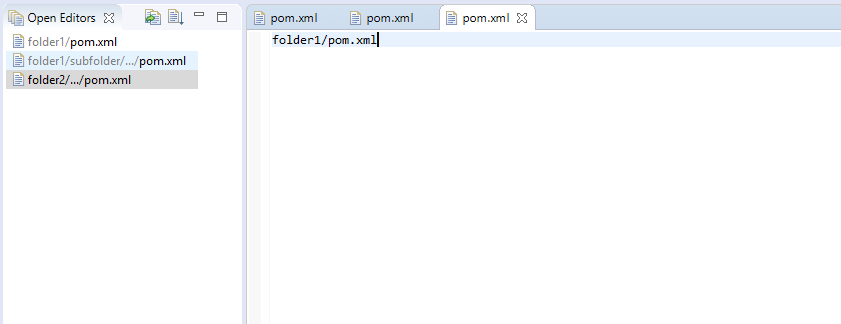
This plugin adds a view that shows all open editors in a vertical list.
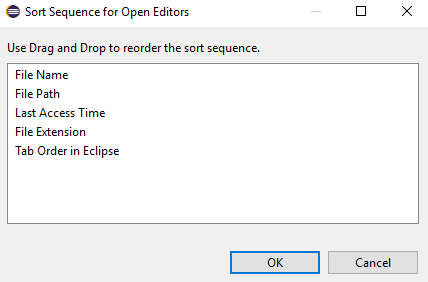
* Sort the list by several properties, e.g., name, path, extension, and access time.
* Pin important editors to the top of the list.
* Folder information is added for editors with the same name to tell them apart.
GitHub: https://github.com/dbickley/OpenEditors
See also the Recent Editors plugin to quickly re-open closed files: https://marketplace.eclipse.org/content/recent-editors
NOTE:
This plugin requires JDK 11 or newer. You can configure the Java VM that is used by Eclipse using the -vm option in eclipse.ini, which is explained here.
Categories: General Purpose Tools, Tools
Tags: Vertical, tabs, editor management, deepnoodle, bickley
Additional Details
Eclipse Versions: 2019-09 (4.13), 2019-06 (4.12), 2019-03 (4.11), 2018-12 (4.10), 2018-09 (4.9), Photon (4.8), Oxygen (4.7), Neon (4.6), 2019-12 (4.14), 2020-03 (4.15), 2020-06 (4.16), 2020-09 (4.17), 2020-12 (4.18), 2021-03 (4.19)
Platform Support: Windows, Mac, Linux/GTK
Development Status: Production/Stable
Date Created: Monday, April 23, 2018 - 22:35
License: Apache 2.0
Date Updated: Friday, January 15, 2021 - 10:08
Submitted by: David Bickley
| Date | Ranking | Installs | Clickthroughs |
|---|---|---|---|
| July 2024 | 301/656 | 30 | 9 |
| June 2024 | 265/681 | 54 | 13 |
| May 2024 | 297/682 | 42 | 18 |
| April 2024 | 266/687 | 61 | 10 |
| March 2024 | 264/694 | 66 | 7 |
| February 2024 | 280/687 | 49 | 11 |
| January 2024 | 267/691 | 62 | 8 |
| December 2023 | 295/671 | 44 | 10 |
| November 2023 | 285/686 | 58 | 8 |
| October 2023 | 319/673 | 42 | 9 |
| September 2023 | 296/663 | 46 | 7 |
| August 2023 | 280/673 | 49 | 7 |
Marketplace Drag to Install Button
By adding the following code below to your website you will be able to add an install button for Open Editors.
HTML Code:
Markdown Syntax:
Output:

Reviews Add new review
eclipse hangs up
Submitted by Oscar Barrofet… on Wed, 06/10/2020 - 02:45
Hello,
I have tried with Eclipse Version: 2020-03 (4.15.0)Build id: 20200313-1211 and java openJDK JDK13 and eclipse hangs up when i invoke the open call hierarchy.
Works ! Stable.
Submitted by Nikita Gromov on Tue, 02/04/2020 - 04:21
Have just set up this plugin. It works well. Thank you!
Eclipse 4.8 + OpenJDK11 + Windows10
Will try the same on my Mac today.
View does not show up
Submitted by Stefan Pachner on Mon, 11/11/2019 - 10:36
Hi,
I installed via marketplace into 2019-09 R (4.13.0), but Open Editor view does not show up. There is a comment that I should use JDK11. My Mac has installed jdk1.8.0_111.jdk. I do not understand how to get from 1.8 to 11?
regards
spachner
Re: View does not show up
Submitted by Andreas Stange on Mon, 11/11/2019 - 14:40
In reply to View does not show up by Stefan Pachner
It is correct that with Java 8, the view will not show up.
I don't have a Mac, but I think you should be able to download OpenJDK for MacOS from here: https://adoptopenjdk.net/releases.html?variant=openjdk11&jvmVariant=hot…
Afterwards, you have to configure this JDK in the file eclipse.ini of your Eclipse installation. Therefor, use the -vm option, as explained here: https://wiki.eclipse.org/Eclipse.ini#Specifying_the_JVM
Re: Re: View does not show up
Submitted by Stefan Pachner on Mon, 11/11/2019 - 16:20
In reply to Re: View does not show up by Andreas Stange
Perfect, installed JDK13 via brew:
And added
to /path/to/Eclipse.app/Contents/Eclipse/eclipse.ini
Now I do have Open Editors working :-)
Many thanks!
spachner