
The YAKINDU EA-Bridge supports direct model-based access to Enterprise Architect UML models from within Eclipse.
- Use the Marketplace Install button to install a trial version into your existing Eclipse instance.
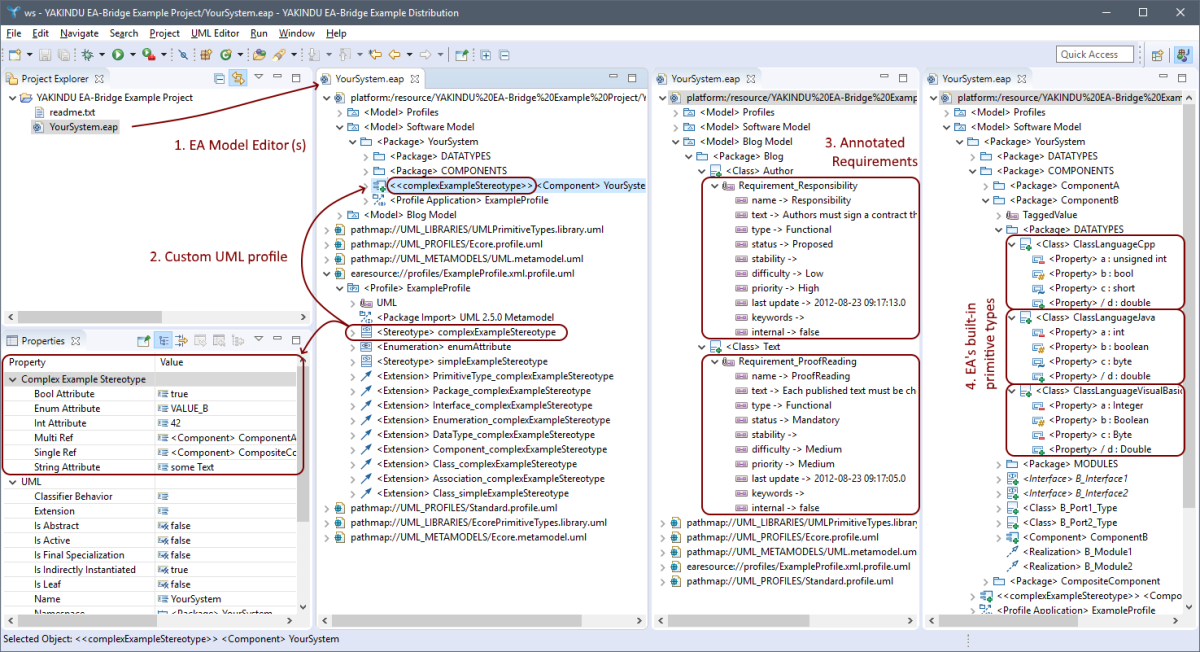
- A ready-to-try Eclipse bundle is available on the YAKINDU product site (including the welcome page shown in the screenshot).
With the YAKINDU EA-Bridge, the whole stack of Eclipse Modeling technologies becomes available for your EA models, making seamlessly integrated state-of-the-art toolchains based on Eclipse technology feasible. For example:
- Use Xtend, ATL, or plain Java to generate customized code or other models from your EA models
- Verify custom constraints on your EA models
- Build JUnit tests to check your constraints or to monitor model metrics
- Perform the steps above in a headless environment, e.g. on a Continuous Integration server
- Be platform independent - access your EA models on Windows, Linux, or Mac OS
Open UML-Based Software Engineering
Realize custom code generators, model validators, or even transformation tools. Build-up your toolchain to be open and future-proof. Make it flexible and extensible and reduce your overall maintenance effort. Ensure your investments are safe, even once the decision is made to replace the modeling front-end. The YAKINDU EA-Bridge is fast, flexible, reliable, and provides full support for UML profiles and libraries.
Technically speaking, it is an API, a facade that provides transparent access to Enterprise Architect model data by means of an Eclipse UML2 in-memory model, which is directly connected to the Enterprise Architect database. For more information and to download a trial version, please visit www.yakindu.com/eabridge, or open the help pages of your YAKINDU EA-Bridge installation.
Categories: Modeling, Modeling Tools, UML
Tags: UML, ea, itemis, YAKINDU, Enterprise Architect
Additional Details
Eclipse Versions: 2019-09 (4.13), 2019-06 (4.12), 2019-03 (4.11), 2018-12 (4.10), 2018-09 (4.9), Photon (4.8), Oxygen (4.7)
Platform Support: Windows, Mac, Linux/GTK
Organization Name: itemis AG
Development Status: Production/Stable
Date Created: Friday, August 10, 2012 - 04:28
License: Commercial
Date Updated: Wednesday, December 11, 2019 - 03:13
Submitted by: Patrick Schneider


| Date | Ranking | Installs | Clickthroughs |
|---|---|---|---|
| July 2024 | 476/656 | 7 | 10 |
| June 2024 | 420/681 | 13 | 12 |
| May 2024 | 387/682 | 20 | 14 |
| April 2024 | 417/687 | 16 | 11 |
| March 2024 | 544/694 | 6 | 4 |
| February 2024 | 528/687 | 5 | 6 |
| January 2024 | 458/691 | 10 | 4 |
| December 2023 | 526/671 | 5 | 9 |
| November 2023 | 404/686 | 19 | 9 |
| October 2023 | 481/673 | 10 | 8 |
| September 2023 | 507/663 | 7 | 14 |
| August 2023 | 532/673 | 5 | 7 |
Marketplace Drag to Install Button
By adding the following code below to your website you will be able to add an install button for YAKINDU EA-Bridge UML.
HTML Code:
Markdown Syntax:
Output:

Reviews Add new review
How can I install it on my eclipse?
Submitted by Alberto Gonzál… on Wed, 09/18/2013 - 04:46
Good morning,
It's no update site for this plugin... Why it's here if we cannot user it?
Thanks
A 30-day trial license is
Submitted by Patrick Schneider on Mon, 03/03/2014 - 09:49
In reply to How can I install it on my eclipse? by Alberto Gonzál…
A 30-day trial license is available via the YAKINDU Shop - you just need to provide a valid e-mail address, payment information is not needed for the trial version. Then you get a link to the update site.